|
|
| Line 1: |
Line 1: |
| | [[Category:Bodywork & Frame]] | | [[Category:Bodywork & Frame]] |
| − | ====What windscreen models are available?====
| + | ===What windscreen models are available?=== |
| | | | |
| | Two board members make custom windscreens. Both have very good feedback from board members. | | Two board members make custom windscreens. Both have very good feedback from board members. |
| Line 17: |
Line 17: |
| | [http://www.zerogravity-racing.com/sportbikes/sptbk_wscreens.htm Zero Gravity] | | [http://www.zerogravity-racing.com/sportbikes/sptbk_wscreens.htm Zero Gravity] |
| | | | |
| − | ZG makes two models that fit the 250, their stock replacement model and the Double Bubble. Both come in a wide range of colors. | + | ZG makes two models that fit the 250, their stock replacement model and the Double Bubble. Both come in a wide range of colors. Below is a comparison of the Double Bubble and OEM screens. |
| | | | |
| | + | [[Image:zg_windscreen_comparison.jpg|170px]] |
| | | | |
| − | ====Honda Reflex windshield mod, developed by [http://www.ninja250.org/blk95 blk95]====
| + | |
| | + | '''Honda Reflex windshield mod, developed by [http://www.ninja250.org/blk95 blk95]''' |
| | | | |
| | [[Image:reflex01.jpg|200px]] [[Image:reflex02.jpg|150px]] [[Image:reflex03.jpg|180px]] | | [[Image:reflex01.jpg|200px]] [[Image:reflex02.jpg|150px]] [[Image:reflex03.jpg|180px]] |
| Line 29: |
Line 31: |
| | | | |
| | | | |
| − | ====How do I properly attach the windscreen to avoid breakage?====
| + | ===How do I properly attach the windscreen to avoid breakage?=== |
| | | | |
| | It is important to put bolts in the center two holes first (loosely), then the two holes beside those, etc, until you've worked your way around the screen. Do not use any type of wrench; hand tighten only. Gradually tighten the centermost bolts a bit, then the next outer pair, and the next, until each pair of bolts is snug but not tight; the screen needs some slack to flex. If you tighten the bolts too quickly, in the wrong order, or too tightly, you risk cracking the screen. | | It is important to put bolts in the center two holes first (loosely), then the two holes beside those, etc, until you've worked your way around the screen. Do not use any type of wrench; hand tighten only. Gradually tighten the centermost bolts a bit, then the next outer pair, and the next, until each pair of bolts is snug but not tight; the screen needs some slack to flex. If you tighten the bolts too quickly, in the wrong order, or too tightly, you risk cracking the screen. |
Revision as of 17:56, 28 June 2007
What windscreen models are available?
Two board members make custom windscreens. Both have very good feedback from board members.
Duke
Duke makes a 16" tall Touring shield. He also has a smaller Sport model. Unfortunately, he also has a full-time job and has been unable to meet all requests in recent months. Please email him to see if he can make one for you.
gti20vturbo
Mike has three models available, from 13.5" to 18" tall. This is also a hands-on, in-his-spare-time operation, so write ahead of time for availability.
Zero Gravity
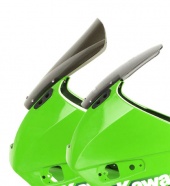
ZG makes two models that fit the 250, their stock replacement model and the Double Bubble. Both come in a wide range of colors. Below is a comparison of the Double Bubble and OEM screens.
Honda Reflex windshield mod, developed by blk95
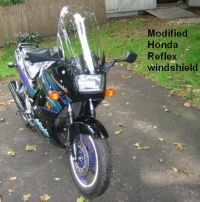
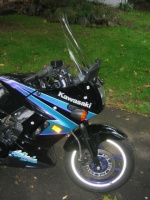
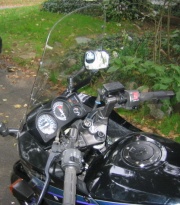
Modifications to the Honda NSS250 windshield, in blk95's own words:
"I had to cut off four original mounting tabs of plastic with a Dremel tool. It then fit right on the fairing, and with a little pressure I could mark where to drill the holes for the mounting screws. I used rubber well nuts. Interestingly, there are already two cutouts in the shield that the levers fit into when you turn hard left or right."
How do I properly attach the windscreen to avoid breakage?
It is important to put bolts in the center two holes first (loosely), then the two holes beside those, etc, until you've worked your way around the screen. Do not use any type of wrench; hand tighten only. Gradually tighten the centermost bolts a bit, then the next outer pair, and the next, until each pair of bolts is snug but not tight; the screen needs some slack to flex. If you tighten the bolts too quickly, in the wrong order, or too tightly, you risk cracking the screen.


